# Home Assistant
Le pv routeur étant compatible avec Home Assistant, voici une documentation pour passer le pas et installer une machine Home Assistant
### **Prérequis**
Il est fortement préférable d'avoir un raspberry Pi avec un disque SSD ou une VM équivalente.
Il existe un OS dédié pour Raspberry ( HAOS ) et c'est le plus simple à installer.
### Installation home-assistant
L'installation est assez simple et il est possible de s'appuyer sur la doc suivante
[https://www.home-assistant.io/installation/](https://www.home-assistant.io/installation/)
[Démonstration](https://demo.home-assistant.io)
### Installation mqtt
j'ai suivis cette doc [https://devotics.fr/installer-mqtt-sur-home-assistant/](https://devotics.fr/installer-mqtt-sur-home-assistant/)
dans configuration logins:
\- username: mosquitto
password: test-123
démarrer
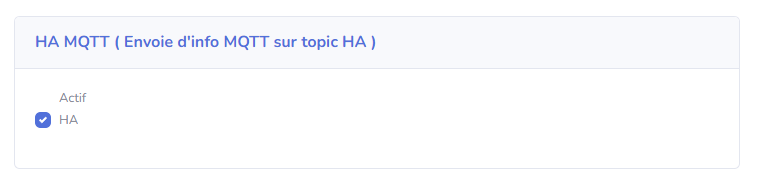
Coté Pv routeur, la configuration est simple.
[http://IP\_PVROUTER/mqtt.html](http://IP_PVROUTER/mqtt.html) > IP\_HA > bouton HA est coché> application des paramètres + [http://IP\_PVROUTER/config.html](http://IP_PVROUTER/config.html) sauvegarder + [http://IP\_PVROUTER/reboot](http://IP_PVROUTER/reboot)
[](https://pvrouteur.apper-solaire.org/uploads/images/gallery/2023-03/image-1677788017723.png)[](https://pvrouteur.apper-solaire.org/uploads/images/gallery/2022-10/image-1665948223836.png)
[http://IP\_DIMMER/mqtt.html](http://IP_DIMMER/mqtt.html) > IP\_HA > application des paramètres + [http://IP\_DIMMER/config.html](http://IP_DIMMER/config.html) sauvegarder + [http://IP\_DIMMER/reboot](http://IP_DIMMER/reboot)
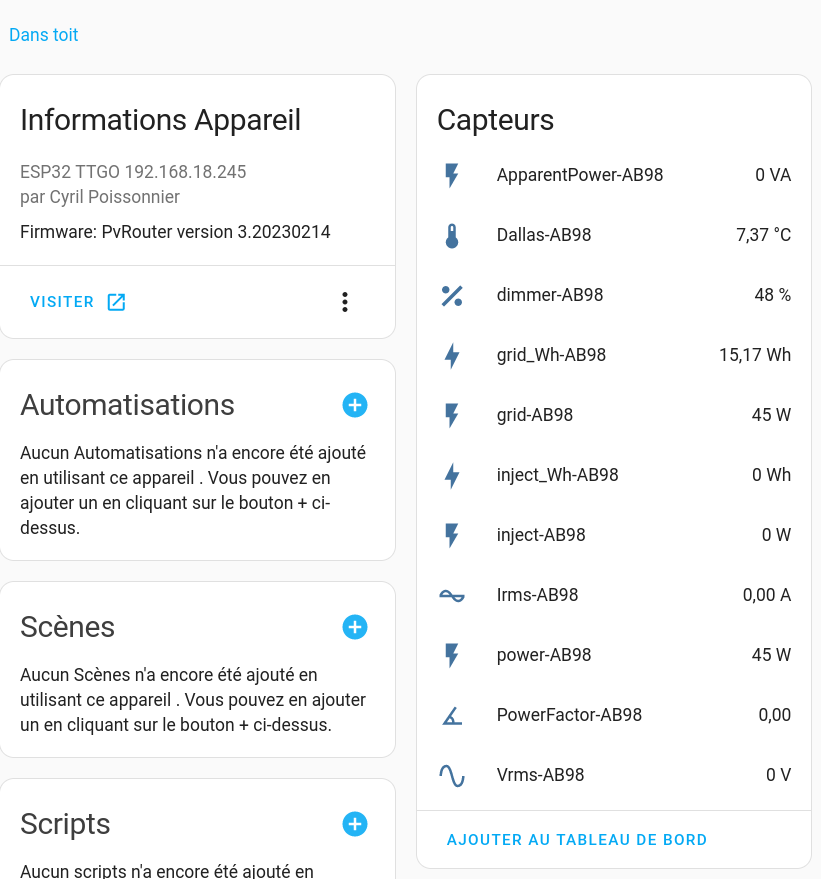
[http://IP\_HA:8123/config/integrations](http://IP_HA:8123/config/integrations) apparait 2 appareils et 22 entités (ils faut entre 2 et 10 minutes)
[](https://pvrouteur.apper-solaire.org/uploads/images/gallery/2023-03/pvrouteur-mqtt-ha.png)
### Configuration energy
W en WH en s'appuyant sur cette documentation
[https://www.home-assistant.io/integrations/integration/](https://www.home-assistant.io/integrations/integration/)
Integration - Riemann sum integral
[http://IP\_HA:8123/config/helpers](http://IP_HA:8123/config/helpers)
\+ Créer une entrée
`Intégrale de Reimann
sensor.sensor_grid_ab98_kwh
sensor.grid_ab98
`
idem avec sensor.inject\_ab98
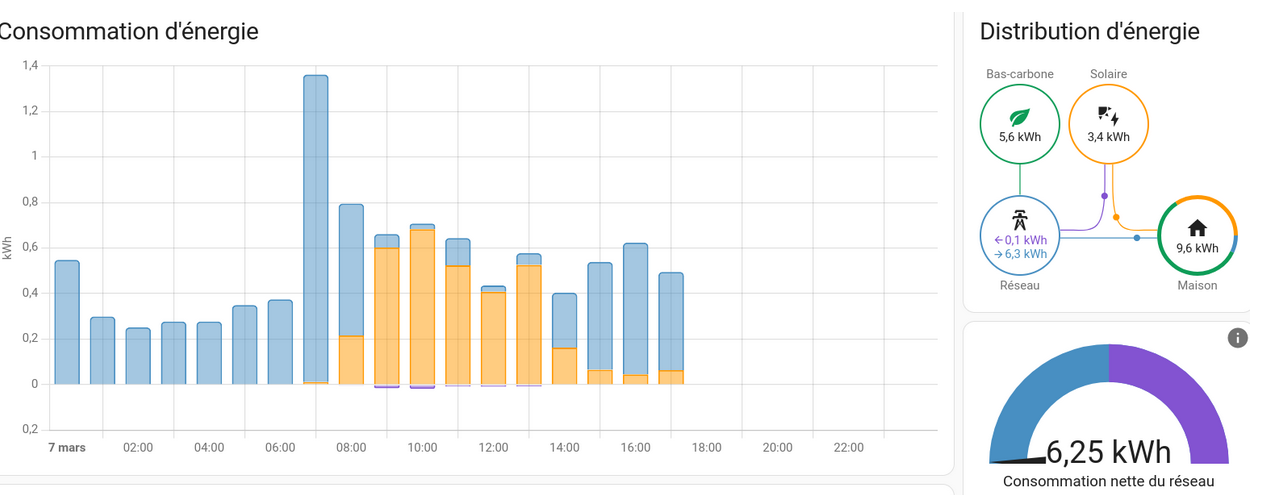
[http://IP\_HA:8123/config/energy](http://IP_HA:8123/config/energy)
Réseau électrique > Consommation du réseau > sensor.grid\_ab98\_Kwh
Réseau électrique > Retourné au réseau > ensor.inject\_ab98\_Kwh
Panneaux solaires > Production solaire > Envoy Lifetime Energy Production
[http://IP\_HA:8123/energy](http://IP_HA:8123/energy)
[](https://pvrouteur.apper-solaire.org/uploads/images/gallery/2023-03/ha-energies.png)
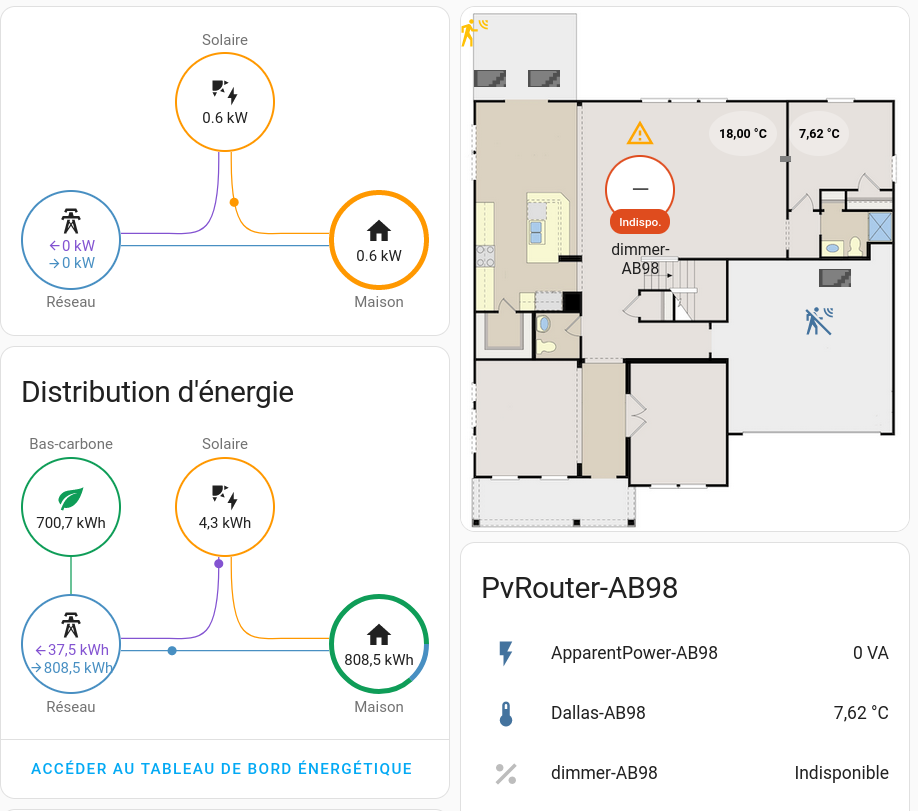
### **Configuration power-flow-card**
il faut HACS suivre en ajoutant ce plugin [https://forum.hacf.fr/t/hacs-ajoutez-de ... lisees/359](https://forum.hacf.fr/t/hacs-ajoutez-des-modules-et-des-cartes-personnalisees/359)
[http://IP\_HA:8123/hacs/frontend](http://IP_HA:8123/hacs/frontend) > + explorer > Power Flow Card
[http://IP\_HA:8123/dashboard-jbb/default\_view](http://IP_HA:8123/dashboard-jbb/default_view) tableau de bord j'ai rajouté une carte power-flow-card
type: custom:power-flow-card
entities:
grid: sensor.grid\_ab98
solar: sensor.envoy\_121516040890\_current\_power\_production
[](https://pvrouteur.apper-solaire.org/uploads/images/gallery/2023-03/ha-energie.png)
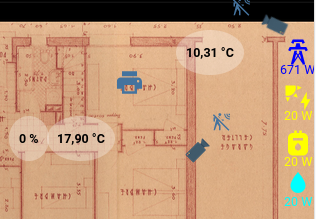
### **Configuration Picture Elements Card plan**
[http://IP\_HA:8123/dashboard-jbb/default\_view](http://IP_HA:8123/dashboard-jbb/default_view) tableau de bord j'ai rajouté une carte
```YAML
type: picture-elements
image: local/jbb/plan-32-lafontaine-rdc-1er.png
elements:
- type: state-label
entity: sensor.dimmer_temperature_2ea1
style:
top: 65%
left: 55%
color: '#000'
border-radius: 50%
text-align: center
background-color: rgba(255, 255, 255, 0.3)
font-size: 10px
font-weight: bold
- type: state-label
entity: sensor.dallas_ab98
style:
top: 50%
left: 80%
color: '#000'
border-radius: 50%
text-align: center
background-color: rgba(255, 255, 255, 0.3)
font-size: 10px
font-weight: bold
- type: state-label
entity: sensor.dimmer_ab98
style:
top: 65%
left: 45%
color: '#000'
border-radius: 50%
text-align: center
background-color: rgba(255, 255, 255, 0.3)
font-size: 10px
font-weight: bold
- type: icon
icon: mdi:transmission-tower
entity: sensor.grid_ab98
style:
top: 50%
left: 97%
color: blue
- type: state-label
entity: sensor.grid_ab98
style:
top: 53%
left: 97%
color: blue
font-size: 8px
- type: icon
entity: sensor.envoy_current_power_production
icon: mdi:solar-power
style:
top: 58%
left: 97%
color: yellow
- type: state-label
entity: sensor.envoy_current_power_production
style:
top: 61%
left: 97%
color: yellow
font-size: 8px
- type: icon
entity: sensor.meter-gas
icon: mdi:meter-gas
style:
top: 66%
left: 97%
color: yellow
- type: state-label
entity: sensor.meter-gas
style:
top: 69%
left: 97%
color: yellow
font-size: 8px
- type: icon
entity: sensor.water
icon: mdi:water
style:
top: 73%
left: 97%
color: cyan
- type: state-label
entity: sensor.water
style:
top: 76%
left: 97%
color: cyan
font-size: 8px
```
[](https://pvrouteur.apper-solaire.org/uploads/images/gallery/2023-03/ha-plan.png)